Don’t Fall for Fake Windows 11 24H2 Downloads – Malware Can Steal Your Data Silently
Updating Windows has always come with its fair share of bugs and frustrations, but a new threat has emerged that is far more dangerous than system glitches. Cybersecurity researchers have uncovered fake Windows 11 update websites designed to trick users into downloading malicious software disguised as a legitimate update.
According to findings from Malwarebytes, this campaign is capable of stealing sensitive data without being easily detected by traditional security tools.
A Convincing Fake That Looks Real
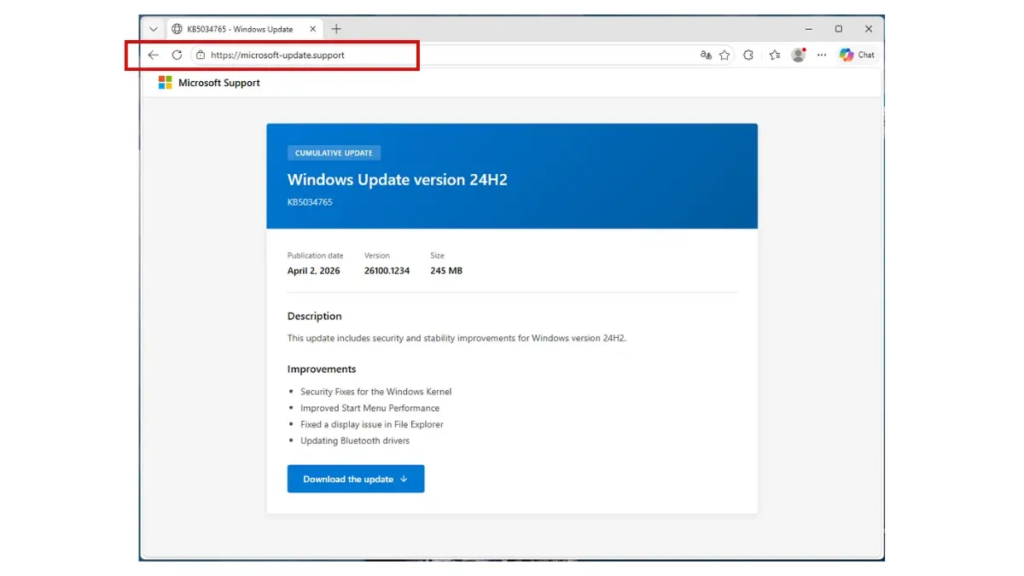
The attackers behind this campaign created websites that closely mimic official Microsoft support pages. By using similar domain names, familiar UI layouts, and even fake knowledge base (KB) references, the pages appear highly credible at first glance.
The scam specifically promotes a Windows 11 24H2 update, complete with a prominent download button designed to lure unsuspecting users.
The Dangerous File Behind the Download
Once users click the download button, they receive an installer file named “WindowsUpdate 1.0.0.msi” with a size of around 83MB.
However, there is a critical red flag.
The update code KB5034765 referenced in the installer actually belongs to older Windows versions, not the claimed 24H2 update. Despite this inconsistency, the malware is cleverly built using tools like WiX Toolset and Electron, allowing it to bypass many antivirus systems during initial scans.
How the Malware Steals Your Data
After installation, the malware executes a Visual Basic script that secretly launches hidden processes powered by Python. These processes install specialized packages designed for data exfiltration.
The primary targets include:
- Saved browser passwords
- Discord tokens
- Payment and financial information
This means attackers can gain access to personal accounts and financial assets, potentially causing severe damage.
Persistence and Stealth Tactics
The malware doesn’t stop after installation.
It embeds itself deeply into the system by modifying the Windows Registry and disguising its components as legitimate security processes. It even creates startup entries that appear as harmless applications like Spotify, making it harder for users to detect.
As a result, the malware can continue running even after system restarts, silently collecting data over time.
How to Stay Safe
To avoid falling victim to this attack:
- Always update Windows through the built-in Windows Update system
- Only download updates from official Microsoft domains
- Be cautious of standalone update files from unknown websites
- Double-check update codes and file sources before installing anything
Taking these precautions can prevent serious consequences, including financial loss and identity theft.
In today’s digital landscape, a single careless click can lead to massive damage. Staying informed and cautious is your best defense.
Origin: Neowin