Red Dead Redemption 2 Ultra Settings Guide: How to Prevent Laptop Fires
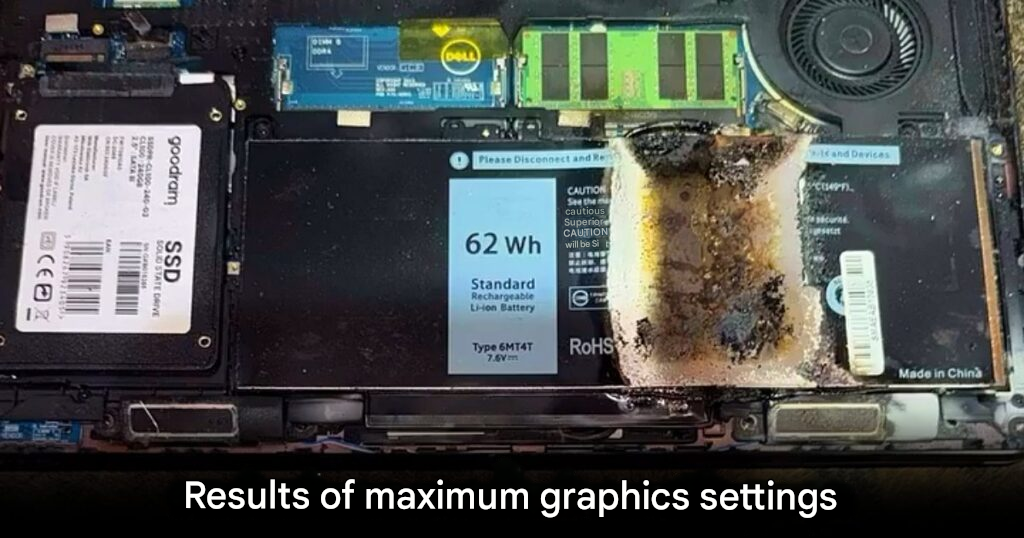
A dramatic incident has gone viral online after a user reported that their laptop caught fire while attempting to run Red Dead Redemption 2. The case quickly gained attention on Reddit, where videos and photos showed thick smoke pouring out of the laptop’s ventilation ports, followed by images of severe internal damage.
An Aging Laptop Pushed Beyond Its Limits
According to the post, the device involved was a Dell Latitude E5470, a notebook released in 2016. The model was originally designed for office and productivity tasks rather than demanding gaming workloads. As a result, seeing it pushed to extreme performance levels surprised many viewers.
The laptop reportedly featured an Intel Core i5-6300U processor, integrated Intel HD Graphics 520, and 8GB of DDR4 RAM. While adequate for everyday tasks, this configuration falls far below the recommended specifications for modern AAA games. Nevertheless, the owner attempted to run Red Dead Redemption 2 under maximum graphical settings.
Ultra Settings Trigger Extreme Heat
What shocked many users was the decision to launch the game with ultra graphics enabled. Red Dead Redemption 2 is widely known for its heavy hardware demands, even on newer systems. Therefore, forcing such a workload on an older laptop dramatically increased heat output.
As temperatures rose, the cooling system reportedly failed to keep up. Consequently, excessive heat buildup may have caused internal components to short circuit or melt. Images shared online showed burn marks across the motherboard, with damage resembling parts exposed to intense flames.
Community Reaction and Safety Concerns
Many commenters questioned why anyone would attempt such a test. Even modern laptops can struggle under Red Dead Redemption 2 at ultra settings. Because business-class laptops prioritize portability over cooling performance, they are especially vulnerable to overheating when misused.
Although cases of laptops catching fire remain rare, this incident highlights the risks of sustained thermal overload. Fortunately, the laptop owner was not injured and managed to record the incident in time before further harm occurred.
A Cautionary Tale for PC Users
This event serves as a strong reminder for PC and laptop users to respect hardware limitations. Running software far beyond a system’s intended purpose can lead not only to crashes or system failure, but also to permanent damage or fire hazards.
In the end, the owner will likely need to replace the destroyed device. Hopefully, this story discourages others from attempting similar experiments and encourages safer usage habits when running demanding games on unsupported hardware.
Origin: Reddit