
Steam Workshop Malware Warning Issued Over Wallpaper Engine Content
Steam users may need to be more careful when downloading user-generated content.
According to security research company Kaspersky, a malware campaign has been detected through Steam Workshop, using wallpaper content as bait to trick users into downloading dangerous files onto their computers.
The warning is especially important for users who download custom wallpapers or visual content without checking the source carefully.
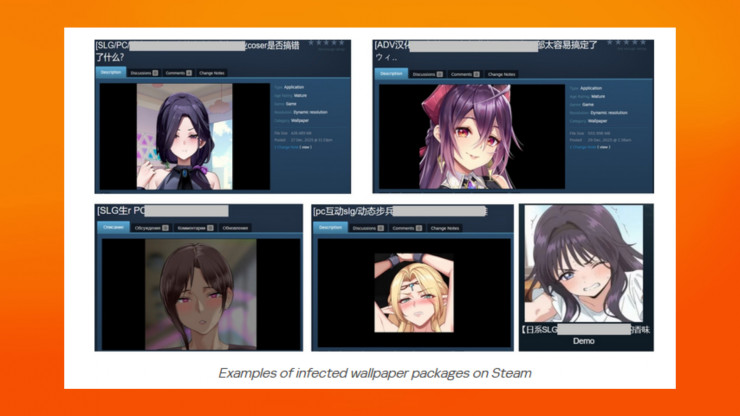
Malware Hidden Inside Wallpaper Packages
The reported campaign involves malicious actors uploading wallpaper packages that secretly contain malware.
The issue is especially concerning for Application Wallpaper content, which can allow software to run EXE files directly on Windows. This means the malware may begin working as soon as the wallpaper is installed on the user’s machine.
The source also notes that some packages may include suspicious files such as hidden DLL files or malware stored inside compressed archives that require passwords.
This makes the threat harder to notice for ordinary users who simply expect to install a visual wallpaper.
Some Wallpapers Look Trustworthy
One of the biggest risks is that these wallpapers can look convincing.
According to the report, some of the malicious wallpapers appeared credible enough that users downloaded them thousands of times. Many users may trust the content because it appears on a familiar platform like Steam.
In some cases, the malware is designed to run quietly in the background. The source also mentions that some packages may even include a game-like element to make the file look more legitimate.
This makes the attack dangerous because users may not realize anything is wrong until their data has already been exposed.
Steam Account Data Is a Major Target
The main goal of the attackers appears to be stealing Steam account information.
The malware campaign may also install additional dangerous software onto the user’s system. The source mentions malware such as Lumma, Vidar, and DarkKomet Backdoor.
These threats can be used to steal personal information, take over usage sessions, or create deeper access to the victim’s computer.
For users with valuable Steam libraries, saved payment details, or linked accounts, this kind of attack can become a serious problem.
Kaspersky Advises Users to Check Sources Carefully
Kaspersky recommends that users carefully check the source of any content before installing it.
This is especially important for user-generated content from unknown creators or suspicious-looking accounts. If users are not sure where an Application Wallpaper came from, it may be safer to avoid downloading it entirely.
Users are also encouraged to scan files with antivirus software that has updated threat data.
Valve Has Removed Some Dangerous Content
The source notes that Valve has already removed some dangerous content from Steam Workshop.
However, threats like this can return at any time. Because Steam Workshop allows user-generated content, users still need to stay alert when downloading anything created by other people.
Even if the platform itself is trusted, not every uploaded file should automatically be treated as safe.
Simple Safety Habits Can Help
Users who often download wallpapers, mods, or workshop content should take extra precautions.
Check the uploader, read comments, avoid suspicious files, and be careful with content that asks for extra steps, hidden files, passwords, or unusual installation behavior.
For Windows users, keeping antivirus software updated is also important, especially when installing content that can run executable files.
The Steam Workshop malware warning is a reminder that even familiar gaming platforms can become a target for attackers. Wallpapers may look harmless, but Application Wallpaper content can carry real risk if it runs hidden files on Windows. Players should stay careful, avoid suspicious uploads, and scan files before installing anything from unknown creators. Protecting a Steam account starts with being selective about what enters your PC.
Origin: pcgamesn