Nvidia DLSS 4.5 Revives 240p Classics, Supports All RTX Cards for Ultra-Crisp Gaming
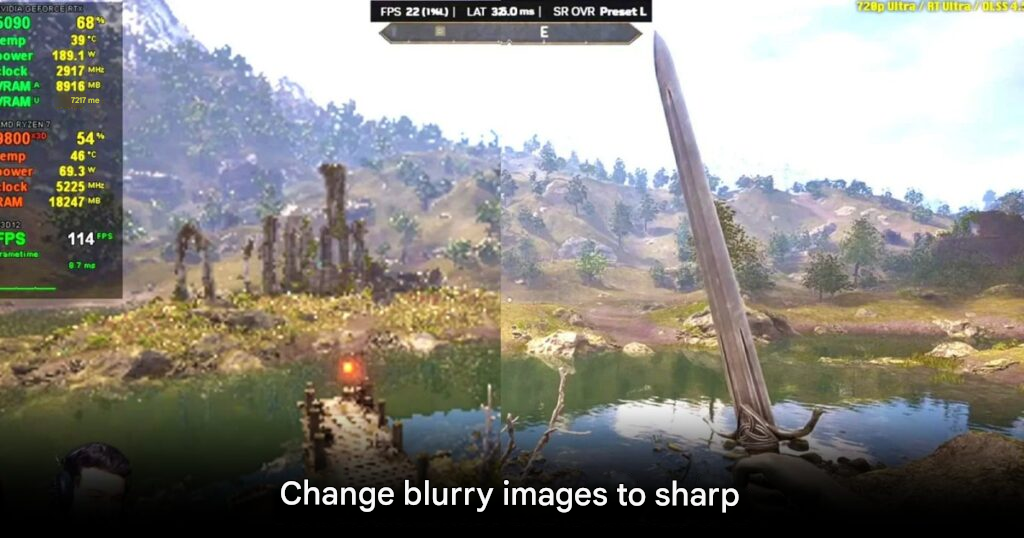
Nvidia’s latest DLSS 4.5 technology is turning heads in the gaming community by dramatically improving visuals in legacy games. Using advanced second-generation Transformer AI models, DLSS 4.5 can upscale low-resolution content—like the classic Elder Scrolls IV: Oblivion at 240p—into crisp, playable 720p images with fluid gameplay. Pixelated textures and unreadable text are now rendered sharply, proving that AI-driven upscaling has entered a new era of sophistication.
Compatibility Across RTX Cards
DLSS 4.5 is accessible to all Nvidia RTX users, from older models such as the RTX 2060 to the latest RTX 5090. Users can enable the feature via a software update without needing to invest in a new GPU, making high-resolution gameplay achievable even on older systems. While CES 2026 didn’t introduce new hardware, this AI upgrade acts as a major value boost for existing RTX owners, letting them experience modern gaming visuals without spending thousands on a GPU upgrade.
Performance Considerations
Testing shows that on older RTX 20 and 30 series cards, DLSS 4.5 may reduce frame rates by 14–24% compared to previous versions due to higher AI processing demands—up to five times more. However, the tradeoff delivers significantly enhanced visual fidelity, including reduced ghosting, sharper light detail, and more faithful rendering of in-game assets.
For high-end RTX 50 series GPUs, the Dynamic Multi Frame Generation feature can create up to six simulated frames per real frame (6x), allowing smooth 4K gameplay with Path Tracing enabled, pushing frame rates past 240 FPS effortlessly. This advancement represents a major leap in balancing ultra-realistic visuals with high-performance gaming.
Minor Limitations
Some fine details—like wires or chain-link fences—may appear slightly blurred during fast movement. Despite this, DLSS 4.5 extends the life of older gaming PCs and laptops, enabling continued enjoyment of AAA titles with modern visual fidelity. Nvidia has pledged to continue refining its Transformer AI models, meaning image quality will improve further over time.
How to Enable DLSS 4.5
Gamers can access DLSS 4.5 via the Nvidia App under the Graphics tab. Selecting DLSS Override as Model M or L activates the advanced upscaling and frame-generation features. This provides an affordable way to enhance game visuals without breaking the budget, especially during a period of volatile PC hardware pricing.
DLSS 4.5 represents a landmark in AI-assisted graphics, allowing players to revisit classics with newfound clarity and experience modern gameplay standards across every RTX card.
Origin: PCMag