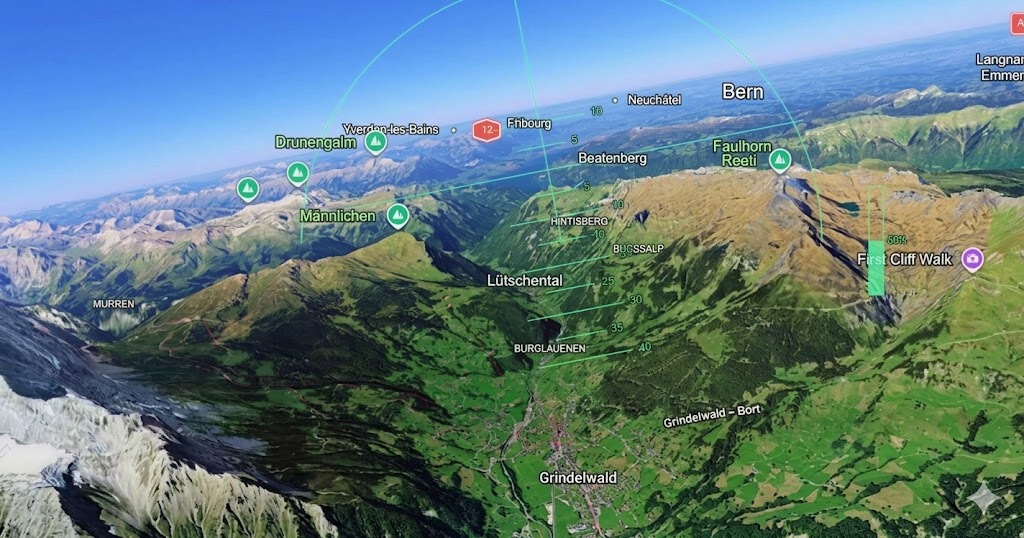
Google Earth Adds Free Flight Simulator Mode on Web
Google Earth just became more fun to explore. Google has officially added a Flight Simulator mode to the web version of Google Earth, letting users fly over the world directly through a browser without installing extra software.
The feature gives users a new way to experience familiar places from above, using Google Earth’s satellite imagery and 3D map data to create a simple but enjoyable flying experience.
How to Access Flight Simulator in Google Earth
Getting into the mode is straightforward. Users only need to open the Google Earth website, look for the Explore Earth menu, and select Tools at the top of the screen. From there, the hidden Flight Simulator option can be launched.
Once selected, Google Earth shifts into a flight-ready view, allowing users to begin flying immediately. The feature is free for all users and does not require a paid membership.
Simple Controls for Casual Flying
The controls are designed to be easy to understand, even for users who have never played a flight simulator before. Players can use the mouse and keyboard arrow keys to guide the aircraft.
The Page Up and Page Down keys control acceleration and deceleration, while the arrow keys adjust direction and altitude. This makes the feature more casual and accessible rather than a serious professional flight training tool.
Fly Over Cities and Landmarks
The biggest appeal of this new mode is the view. Since the feature pulls from Google Earth’s satellite and 3D data, users can fly over cities, landmarks, terrain, and other recognizable places around the world.
While it is not meant to compete with dedicated flight simulation games, it offers a relaxing way to explore the planet from a different perspective. It also gives users a reason to revisit Google Earth even if they have not opened it in a while.
Restart Quickly After a Crash
Google also keeps the experience simple when things go wrong. If the aircraft crashes into the ground or an obstacle, the system provides a Restart option so users can quickly try again.
For the best experience, users should have a stable internet connection. The simulator loads 3D map data while flying, so smoother performance and sharper visuals depend on how well the connection can keep up.
Google Earth Flight Simulator is not a hardcore aviation sim, and that is exactly why it works. It feels more like a fun discovery tool than a serious game, giving users a light and accessible way to explore real-world locations from above. For anyone looking for a quick browser-based activity, this is a neat reminder that Google Earth still has room for surprises.
Origin: Euronews