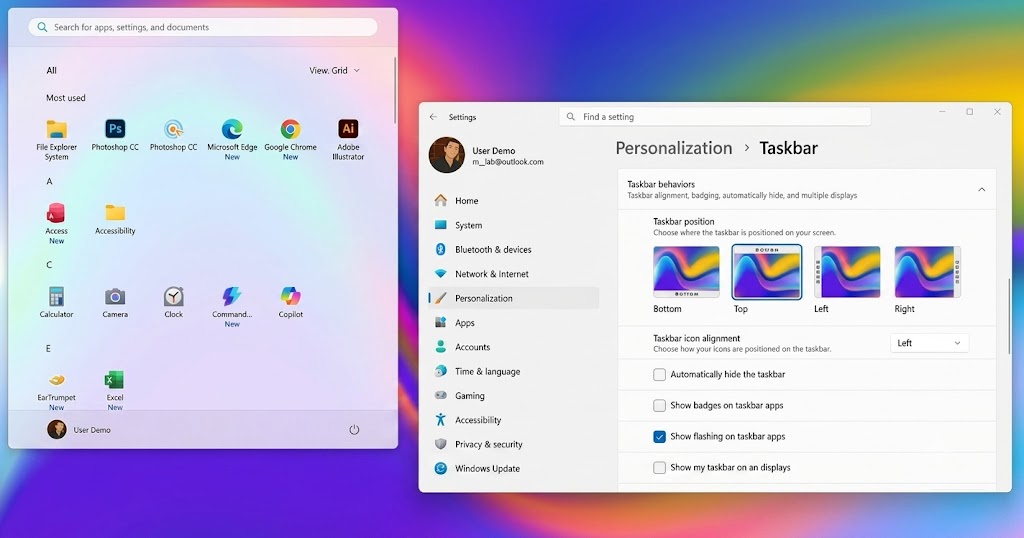
Windows 11 Taskbar settings may finally become easier to use, as Microsoft tests a redesigned menu that gives users more direct control over desktop customization.
According to the source, the update is currently rolling out through an experimental Windows Insider channel. It focuses on improving the Taskbar settings menu, making options easier to find, cleaner to manage, and less dependent on third-party tools or risky system tweaks.
For users who felt limited by the original Windows 11 Taskbar setup, this looks like a welcome change.
Windows 11 Taskbar Settings Move Into a Cleaner Menu
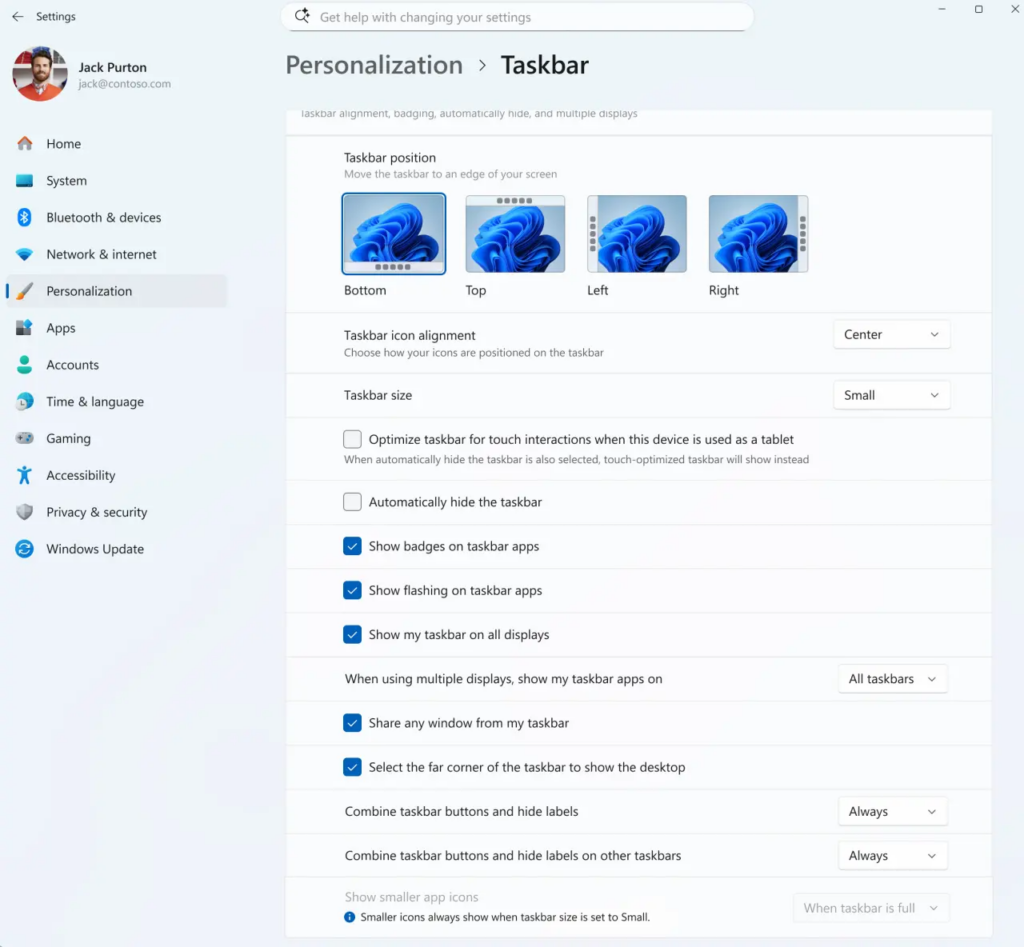
The biggest improvement is the redesigned Windows 11 Taskbar settings menu.
Microsoft is placing more customization options under Settings > Personalization, giving users a more official and organized way to adjust the desktop experience.
That matters because many Windows 11 users previously had to rely on Registry edits or third-party tools to bring back certain Taskbar behaviors. With this update, Microsoft appears to be responding to long-running feedback from users who wanted more control without extra software.
Taskbar Size Options Are Being Tested
One of the highlighted changes is Taskbar size adjustment.
The source says users will be able to adjust the Taskbar size more flexibly depending on their setup. This could help notebook users reclaim vertical screen space, while ultrawide monitor users may prefer a layout that gives icons more room.
The update also improves how the system transitions between different button sizes, including smaller and standard modes.
That should make customization feel smoother and less clunky.
Taskbar Position Options Return to the Conversation
The redesigned menu also adds easier access to Taskbar positioning behavior.
According to the source, users who prefer placing the Taskbar at the side or top of the screen will be able to manage that through the updated Taskbar behaviors menu.
This is one of the most requested areas for many longtime Windows users, especially those who prefer vertical workspace layouts or multi-monitor setups.
If Microsoft keeps this direction, Windows 11 could feel more flexible for people who want their desktop arranged around how they actually work.
No Restart Needed for Some Changes
Another useful detail is smoother switching.
The source says the new Taskbar options are designed to apply more fluidly without requiring a full system restart. That makes testing different layouts less annoying, especially for users who like adjusting their workspace depending on task, monitor, or device.
Small quality-of-life improvements like this matter because customization should feel quick, not like system surgery.
Windows Insider Users Get It First
For now, the redesigned Windows 11 Taskbar settings menu is still being tested.
Microsoft is rolling it out to Windows Insider users first. If the feature does not run into major issues, it may eventually reach general Windows 11 users in a future update.
That means regular users should not expect it on every PC immediately. Still, it is a strong sign that Microsoft is listening more closely to feedback about desktop freedom.
A Good Step for Everyday PC Users
The Windows 11 Taskbar settings redesign may not sound flashy, but it could have a real effect on daily use.
The Taskbar is one of the most-used parts of Windows. If users can resize it, move it, and manage it more easily, the whole desktop experience can feel less restrictive.
For PC users who value workflow control, this update could make Windows 11 feel more personal again.
For more technology and gaming industry updates, visit This Is Game SEA.
THIS IS our take
Windows 11 Taskbar settings getting a proper redesign is the kind of update that sounds small until you remember how often people stare at the Taskbar every day. Microsoft does not need to reinvent the desktop here. It just needs to give users back practical control without forcing them into Registry edits or third-party tools. If this rollout goes smoothly, Windows 11 may finally feel a little less stubborn.