Windows Update Adds New Controls to Prevent Work Interruptions
Users can now pause updates longer and avoid forced restarts
Anyone who has ever experienced their computer suddenly restarting to install a Windows update can finally breathe a sigh of relief. Microsoft is beginning to roll out new features that give users greater control over their own devices. This improvement comes after the team received over 7,621 feedback reports, all pointing to the same issue: updates often interrupt work and lack flexibility in scheduling.
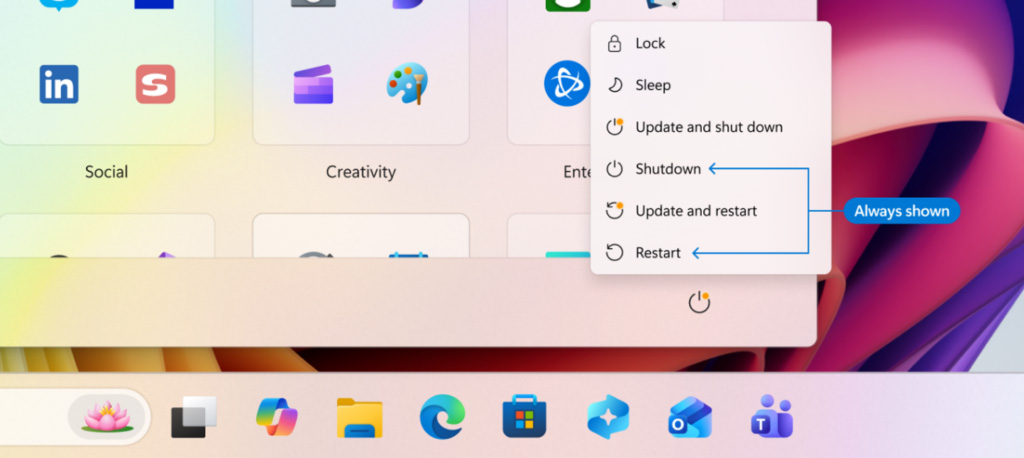
The most noticeable change is the improvement to the Power menu, making it much smarter than before. Previously, when updates were pending, users were often forced to choose options like Update and Shut Down only. In the new version, options are clearly separated, allowing users to simply shut down or restart normally without triggering updates. This is especially useful for people who are in a hurry or need to continue working without waiting for installations to finish.
In addition, Microsoft now allows users to pause updates for up to 35 days through a calendar interface where you can freely select your preferred date. Even better, users can continue extending the pause duration without strict limits, removing the concern that Windows might suddenly install updates during critical work periods.
Another improvement focuses on driver updates, which previously displayed confusing manufacturer names. The system will now clearly indicate the type of update, such as display, audio, or battery drivers, making it easier for users to decide what to install first.
One of the most important highlights is the grouping of updates. Instead of requiring multiple restarts for different updates like drivers, .NET, or firmware, the system will now bundle them together and install everything in a single restart cycle each month. Updates are downloaded quietly in the background and installed only when the user allows it, significantly reducing interruptions.
Currently, these features are being tested with Windows Insiders in the Dev and Experimental channels before being released to the public in the near future. This marks an important step for Microsoft, showing a stronger focus on real user experience rather than forcing updates without flexibility.
Origin: Bleepingcomputer